Adding staff members and players to Just Play can very effectively be done a couple of ways. The first step is to use our CSV uploader to upload your roster to Just Play.
Step 1) Upload Roster Using .CSV file
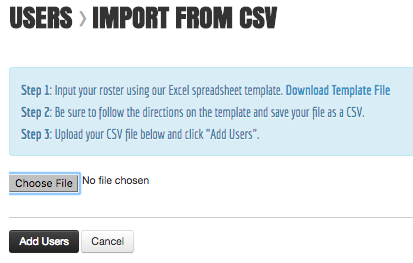
Step 1a) Navigate to Users/Groups
Step 1b) Click Players > Import from CSV
Step 1c) Use the "Download File Template" to provide a template for uploading
Step 1d) Import Roster from CSV (Must save excel file as CSV)
Step 2) Invite your team to join Just Play
Option A) Sending an invite email for the player or coach to do on their own.
Note: Invite emails are only valid for 24 hours. So make sure they do it right away!
Option B) Creating an invite session
Note: This works best when displayed during a team meeting, project the invite url on the screen and let your team follow the instructions.
Option A: Invite Email
You will receive this email from Just Play (shown below) and be able to set up your account.
Password: 8 Digits (this is a temporary password), you will be able to create a new one after initially logging in.
Set Up My Account: This button is also a temporary link, however if you ever lose your website URL then,
Your team site, will still be available to you but you must this is only active for individuals who have previously set up their account.
Step 1) Copy the temporary 8 digit password
Step 2) Click "Set Up My Account"
Step 3) Enter Username / Password from your Invite Email
Step 4) Create Your Own Password
if you're setting up your account on a Phone or Tablet be sure to check out accessing Just Play on mobile devices.

Option B: Creating an Invite Session
Step 1) Click Users and Groups > Players > Create Invite Session
Step 2) Create a temporary password (Example = Bulldogs)
Step 3) Set the duration of time in which the temporary password works (Example = 48 Hours)
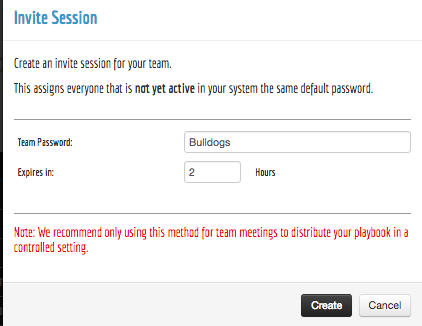
Step 4) Click Create
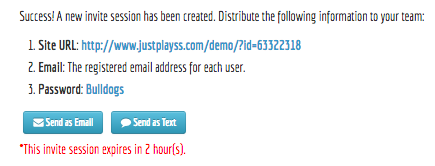
Now you have the option to either send as email / text or display for your team to handle right away. Feel free to screenshot this screen in order to save it use later on if you have to navigate off the screen. You will not be able to get back to this screen once you have left. Follow the instructions below and your team will be active!
Be sure to save to your home screen in order to have the app on your phone. For instructions on this, see accessing Just Play on mobile devices.
0 Comments